![[decorative]](https://mixagame.com/wp-content/uploads/2025/10/cropped-mixagame-redwhite-logo-1024x256-1.png)

There is a moment every PC gamer eventually faces. Performance is slipping, frame rates are inconsistent, and the upgrade itch becomes impossible to ignore. The question that follows is almost always the same: do I upgrade the CPU or the GPU?
Most people guess. They pick the part that sounds more impressive in a spec sheet. Or they go with whatever is on sale. Or they follow advice from a forum thread written for a completely different build. The result is often an expensive upgrade that moves the needle far less than expected. After all, the wrong component got the money.
In 2026, this decision is more nuanced than it has ever been. Game engines are more complex, and CPU workloads have expanded. As a result, the line between processor-limited and GPU-limited performance is blurrier than the simple explanations suggest. Getting this right takes two things. First, understand what each component actually does inside a running game. Then, honestly diagnose your own system.
What the GPU does in a game
The graphics processing unit is responsible for rendering what you see on screen. Every frame your monitor displays, the GPU calculated it. Geometry, lighting, shadows, reflections, post-processing effects, ray tracing, upscaling through technologies like DLSS 3.5 or FSR 4: all of that flows through the GPU pipeline.
In most gaming scenarios, the GPU is doing the heaviest lifting by a significant margin. That is why GPU specs dominate gaming hardware conversations. And it is why a weak graphics card is the most common bottleneck in mid-range and budget builds.
When your GPU is the limiting factor, the signs are clear. Raising your resolution or graphical settings makes your frame rate drop noticeably. Lowering those settings brings it back up. The GPU is clearly working at its ceiling, and nothing else in the system is the problem.
This is GPU-limited performance. It is the most common situation for gamers running at 1440p or 4K. And it is where a GPU upgrade produces the most dramatic, immediate results.

What the CPU does in a game
The central processing unit handles game logic, artificial intelligence, physics simulations, audio processing, and communication between your system’s components. It also manages everything outside the game: the operating system, background applications, overlays, and streaming software if you run it.
In CPU-limited scenarios, your processor cannot feed frames to the GPU fast enough. The GPU sits partially idle, waiting for the CPU to finish its calculations before it can render the next frame. The result is a frame rate that feels choppy or inconsistent. Meanwhile, your GPU usage in monitoring software reads lower than expected.
CPU limitations show up most clearly at lower resolutions. At 1080p, the GPU completes frames faster, which means the CPU’s speed becomes the ceiling more quickly. Competitive esports players push 1080p at 240Hz or higher. They are far more likely to hit CPU bottlenecks than someone running story games at 4K.
CPU workload also varies significantly by game genre. Some genres lean hard on the processor. Open-world games with dense NPC populations, or complex simulations like city builders and grand strategy, stress the CPU in ways a linear shooter never does.
How bottlenecking actually works
The word bottleneck gets used loosely in gaming discussions, so it helps to be precise.
A bottleneck exists when one component is limiting the potential output of another. Every system has a bottleneck somewhere. The goal is not to eliminate it. Rather, it is to ensure it sits at a reasonable, expected place given your hardware.
A system where a strong CPU is paired with a weak GPU is GPU-bottlenecked. The CPU finishes its work quickly and waits. In this case, upgrading the CPU produces almost no gaming improvement because it was already ahead of the curve. The GPU is the constraint, and that is where the money should go.
A system where a very powerful GPU is paired with an aging CPU is CPU-bottlenecked. The GPU is capable of rendering far more frames than the CPU can request. Upgrading the GPU in this scenario is largely wasted investment until the processor catches up.
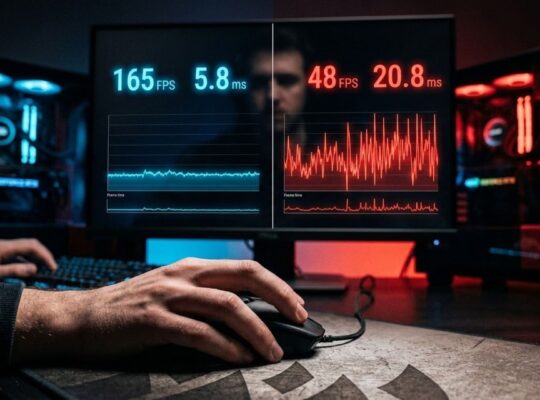
The clearest diagnostic tool available to most gamers is a hardware monitoring overlay during gameplay. Tools like MSI Afterburner with RivaTuner Statistics Server let you watch GPU usage and CPU usage simultaneously in real time. Does your GPU usage sit consistently at 95 to 99 percent during gameplay? Then your system is GPU-limited, and that is where the upgrade budget belongs. If GPU usage is fluctuating between 60 and 80 percent while frame rates feel inconsistent, your CPU is likely the constraint.

Resolution changes the answer
One of the most practical and underappreciated facts in this debate is that resolution shifts the bottleneck.
At 4K, the GPU is under enormous pressure to render four times the pixels of 1080p. The CPU workload does not scale in the same way. So a system that feels CPU-limited at 1080p will often become GPU-limited at 4K with the exact same hardware. Changing nothing but the resolution can shift where the bottleneck sits.
This is why resolution context is essential when someone asks whether to upgrade their CPU or GPU. The right answer for a 1080p competitive player is frequently different. It rarely matches the answer for someone running a narrative open-world game at 4K.
| Resolution | Typical Bottleneck | Priority Upgrade |
| 1080p high refresh rate | CPU in many scenarios | CPU or GPU depending on game |
| 1440p balanced gaming | GPU in most scenarios | GPU |
| 4K max settings | Almost always GPU | GPU |
| Esports titles any resolution | CPU more likely | CPU if aging |
Game genre matters more than people admit
Genre is a variable that rarely gets enough attention in CPU versus GPU discussions.
Simulation games, strategy titles, and open-world RPGs with complex NPC behavior lean on the CPU. They are meaningfully more CPU-dependent than linear action games or shooters. A heavily modded version of a game like Civilization VII or a late-game city in Cities: Skylines 2 will expose CPU weaknesses that would never appear in a multiplayer shooter.
Conversely, graphically intense titles built around visual fidelity, games pushing real-time ray tracing at high resolutions, are almost exclusively GPU-bound. The CPU clears its portion of the workload quickly and spends time waiting.
Knowing your library matters. If you primarily play one type of game, the genre should influence your upgrade decision as much as any benchmark.

The 2026 landscape: where things actually stand
The current CPU generation from Intel and AMD is strong. Most mid-range and high-end gaming builds are not meaningfully CPU-limited in typical scenarios. Take a processor from the last two to three years, paired with a capable GPU. In most games at most resolutions, the GPU will be the ceiling.
CPU upgrades make sense in specific situations. Think processors that are four or more generations old. Or a modern high-end GPU held back by a much older processor. Or setups built specifically for competitive play at high refresh rates.
For anyone thinking through where their system stands as a complete picture, understanding how the CPU and GPU divide workloads is part of the broader story covered in the complete guide to gaming PC components, which walks through how each part of a build contributes to overall performance.
The upgrade decision in plain terms
When GPU usage is inconsistently low and frame rates feel choppy despite a capable graphics card: investigate the CPU.
For an aging setup starting from a weak foundation, the answer is clear. The GPU almost always produces a larger gaming improvement per dollar in the current market.
Competitive titles at 1080p chasing refresh rates above 144Hz change the calculation. There, the CPU matters more, and a modern processor with strong single-core performance is worth prioritizing.
The mistake most people make is upgrading based on spec envy rather than actual system diagnosis. A reviewer’s benchmark runs a different resolution, a different game, and different supporting hardware. So it tells you very little about your specific situation. Your monitoring data tells you far more.
Knowing your bottleneck is one of those skills that separates gamers who spend wisely from those who spend enthusiastically. Hardware decisions made without that context are essentially guesses dressed up as upgrades. The good news is that honest diagnosis takes about ten minutes with the right tools. And the answer is worth far more than any spec sheet comparison. The harder question is whether you will accept the answer your own data gives you. Sometimes the upgrade you wanted is not the upgrade you actually need.
What does your GPU usage look like during your most demanding sessions, and has it ever surprised you?